

Key takeaways
- You can delete a review you wrote yourself instantly, from Your contributions in Google Maps.
- You cannot delete a review someone else left. You can only report it for a policy violation.
- Google removes reviews that are spam, fake, off-topic, offensive, impersonation, or a conflict of interest, not honest negative ones.
- Reported reviews take several days to about two weeks, with a one-time appeal if denied.
- When a review will not come down, reply professionally and build more genuine reviews to outweigh it.
Can you actually delete a Google review?
It depends on who wrote it, and this is where most guides get vague. There are only two real situations, and they work completely differently.
| Situation | Can you delete it? | How |
|---|---|---|
| You wrote the review | Yes, instantly | Delete it from Your contributions in Google Maps |
| Someone else wrote it | No, not directly | Report it, and Google removes it only if it breaks a policy |
So a business owner cannot simply erase a one-star rant. Honest negative feedback is allowed to stay, even if it stings. What you can remove is a review that violates Google's content rules, and that is a narrower list than most people expect.
How to delete a Google review you wrote
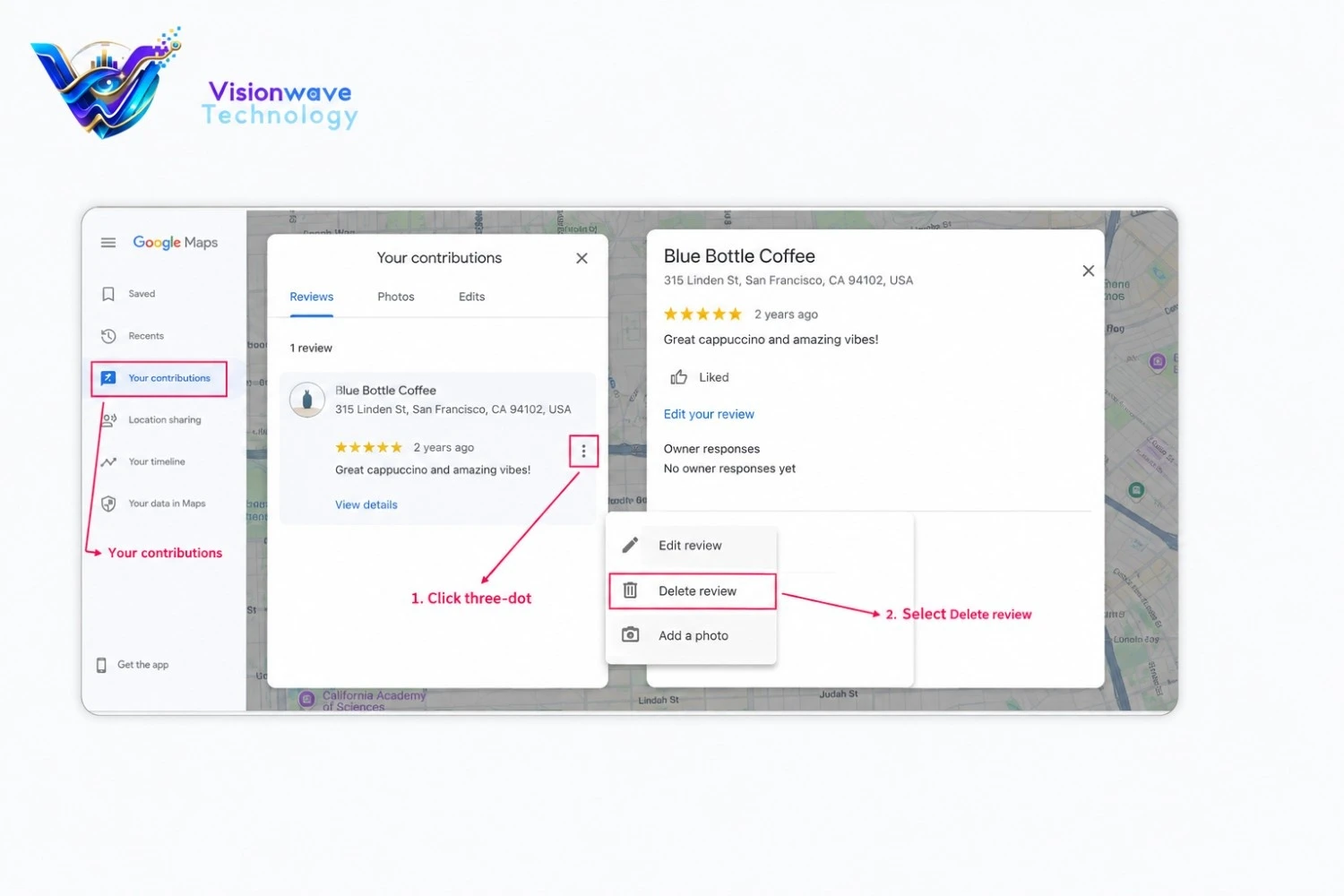
Left a review on the wrong business, or changed your mind? Deleting your own review takes about 30 seconds and there is no waiting period.
On a computer
- Open maps.google.com and sign in with the account you used.
- Click the menu (the three lines, top left).
- Click Your contributions, then the Reviews tab.
- Find the review, click the three-dot menu next to it, and choose Delete review.
- Confirm. It disappears right away.
On the Google Maps app
- Open Google Maps and tap your profile picture (top right).
- Tap Your contributions, then Reviews.
- Tap the three dots on the review and tap Delete.
Want to fix a review instead of removing it? Use Edit in the same menu. That keeps your history and just updates the star rating or text. This is the answer to the common question of how to delete my Google review without losing the ability to re-post later.
How to remove a Google review someone else left
This is the real business owner problem. You cannot delete it, so your only route is to report it and let Google decide. Reporting works best from your verified Business Profile, because Google knows the request is coming from the owner.
Step by step: report a review from your Business Profile
- Search your business name on Google while signed in to the profile's account.
- Click Read reviews.
- Next to the review, click the Report icon (three dots or a flag).
- Pick the violation reason (for example Spam or Profanity).
- Click Send report.
You can also use Google's Reviews Management Tool, which lets you report a review, confirm your email, pick the business, and then track the status of every flag in one place. That status tracker is the reason serious owners prefer it.
Which reviews Google will actually remove
Here is the part that saves you wasted effort. Google only pulls down reviews that break its prohibited and restricted content policies. The common ones for businesses:
| Violation | Example | Removable? |
|---|---|---|
| Spam or fake | A bot review, or one from someone who was never a customer | Yes |
| Off-topic | A political rant that has nothing to do with your service | Yes |
| Offensive or profanity | Slurs, harassment, sexually explicit text | Yes |
| Conflict of interest | A review from a competitor or a former employee | Yes |
| Personal information | Your staff member named with their phone number | Yes |
| Impersonation | A reviewer pretending to be someone else | Yes |
| Honest but negative | "Food was cold and service was slow" | No |
Notice the last row. A genuine bad experience is not a violation, even if it is unfair or one-sided. Flagging honest reviews just burns your credibility with Google's system, so pick your battles.
The 60-second removal test (before you flag anything)
We use this quick check with clients before touching the report button. Run the review through three questions:
- Is it a real customer? If you have no record of them and the details are wrong, that points to fake or conflict of interest.
- Is it about your business? If it rants about something you do not even sell, it is off-topic.
- Does it break a line? Slurs, threats, personal data, or an ad for another company all cross a policy.
If you answered yes to any of these, report it and name that exact category. If all three are no, it is an honest review. Do not flag it. Respond to it instead (more on that below).
How to word the report so it actually lands
When you flag, be specific. A vague "this is unfair" gets denied. Use this template in the appeal box:
"This review violates the [name the policy, e.g. conflict of interest] policy. The reviewer [state the fact, e.g. is a former employee / was never a customer / posted a competitor's name]. Requesting removal under that policy."
What happens after you report, and how to appeal
Google usually takes several days to review a flag, often up to about two weeks. Check the status in the Reviews Management Tool. Three outcomes are possible:
- Removed. The review breached a policy and is gone.
- No violation found. You get a one-time appeal. Use the same tool, quote the policy and the offending text, and explain in one or two sentences why it qualifies.
- Still denied. Post your case on the Google Business Profile Community with your Case ID. Product Experts there can escalate genuinely valid cases.
When a Google review will not come down
Most negative reviews are honest, which means they stay. That is not the end of the story. Learning how to delete negative reviews on Google is only half the job; the other half is making the honest ones matter less. Two moves do the heavy lifting:
- Reply publicly, calmly, within 24 hours. Future customers read the reply more than the review. A professional, specific response ("Sorry about the wait on the 3rd, we have added an extra technician on weekends") often does more good than a removal would.
- Bury it with real reviews. One bad review among 12 is noise. One bad review among 4 is your reputation. Ask happy customers at the right moment, with a direct review link, and your rating recovers fast.
This is exactly where a reputation management process earns its keep: flagging what breaks policy, replying to what does not, and steadily building a review base that reflects the real quality of your work.
The honest truth about "guaranteed" review removal
If an agency promises to delete any Google review for a fee, walk away. Nobody can force Google to remove an honest review, and services that mass-flag or post fake positives get businesses penalised. The only legitimate path is the policy-based reporting above, plus real reputation work. Anyone selling more than that is selling risk.
Frequently asked questions
No. A business owner cannot delete a review a customer left. You can only report it, and Google removes it only if it breaks a content policy such as spam, off-topic, offensive language, or conflict of interest. Honest negative reviews are allowed to stay.
Open Google Maps, go to Your contributions, then Reviews, tap the three-dot menu on the review and choose Delete. It is removed instantly, with no waiting period.
Usually several days, and sometimes up to about two weeks. You can track the status in Google Reviews Management Tool and submit a one-time appeal if the first result is no violation found.
Yes, if you can show it breaks a policy. Fake reviews and reviews from competitors or former employees fall under spam or conflict of interest, which are removable. Report it and name that exact policy.
Because an honest bad experience is not a policy violation. Google only removes reviews that break its content rules, not ones that are simply negative. Reply to it professionally and build more genuine reviews to reduce its impact.
No legitimate service can force Google to remove an honest review. Avoid anyone promising guaranteed removal or fake positive reviews, as mass-flagging and fake reviews can get your profile penalised. Use policy-based reporting and real reputation management instead.
Yes. When a review is deleted or removed, its star rating goes with it and your average updates. Editing a review instead keeps it but updates the stars and text.
Want results like this for your business?
We plan, execute and report on SEO, ads and web for businesses across Noida and Delhi NCR, with numbers you can actually check.
